 Clip
Home / English
ClipAgent in English
A summary of ClipAgent for reviewers and English speakers. The app is available in 8 languages, English included; the rest of the website is in Spanish.
What ClipAgent is
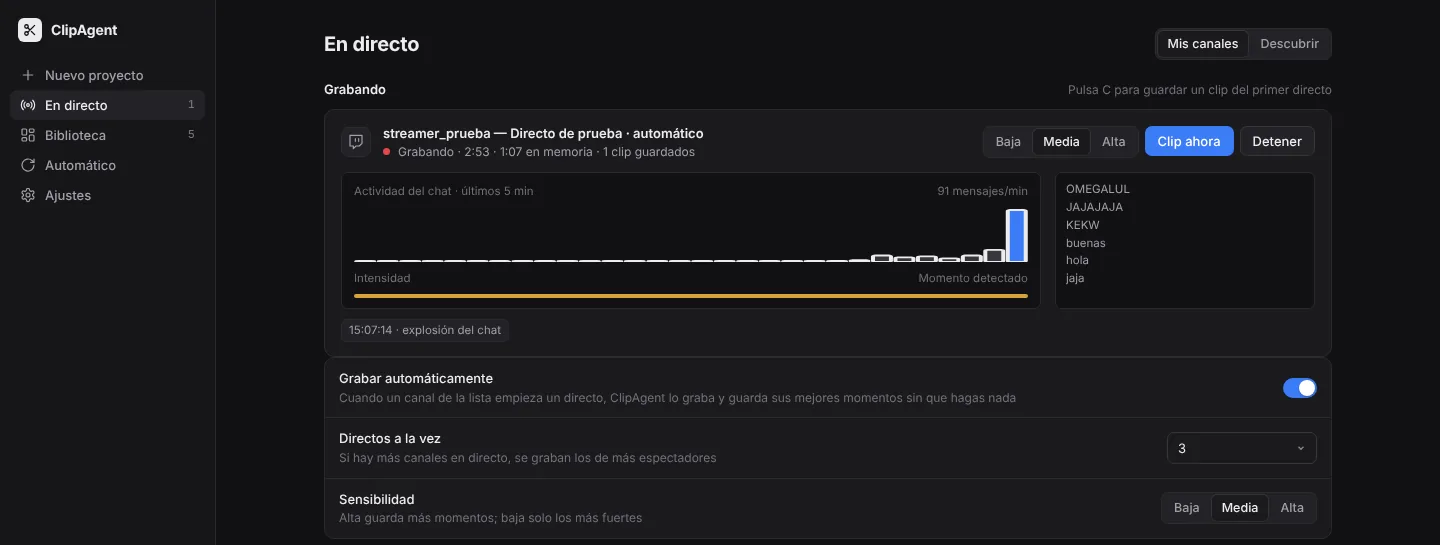
ClipAgent (clipagent.stream) is a desktop app for macOS and Windows, with a free plan and paid plans, for streamers and clip editors. It records live streams from Twitch and Kick on the user's own computer, uses the chat and the audio to detect the best moments, and exports vertical 9:16 clips with the webcam on top, the gameplay below, word-by-word subtitles, a headline, a suggested title, description and hashtags, and a score from 0 to 100. Clips can also be made from videos, not only live streams. YouTube as a recording source is coming soon.
The app's interface is available in 8 languages: English, Spanish, French, German, Italian, Portuguese, Dutch and Polish. It follows the computer's language automatically (English if the computer's language is not one of the 8). Subtitles and clip texts follow the language of each video, separately from the interface.
Video and audio are processed on the user's computer: a Mac with Apple silicon and macOS 14 or later, or a 64-bit PC with Windows 10 or 11. AI features use the user's own Anthropic API key, optionally. Intel Macs and Linux are not supported. On Mac (current version 2.33.2) the app is distributed as an installer (.pkg or .dmg) signed and notarized by Apple; on Windows (current version 2.33.1), as a Setup.exe installer (not yet code-signed, so SmartScreen may warn the first time) or a one-line PowerShell install that checks the SHA-256 fingerprint. The installer is downloaded from clipagent.stream, and the app updates itself from inside the app.
Status and plans
ClipAgent is available to download now from clipagent.stream, for Mac and Windows, with the same plans on both. Prices in euros, VAT included:
- Gratis (free): no card and no end date. 3 clips a day (renewed at midnight), 1 stream started by hand, videos up to 60 minutes, 1080 × 1920 clips with no watermark, optional AI with your own key on 3 videos a day; you upload each clip yourself. Any change to its limits is announced 3 months ahead.
- Básico (Basic): 19 €/month (15.20 €/month paid yearly). 1 stream at a time, recorded automatically when it starts; unlimited clips; up to 60 fps; subtitle translation and Remake.
- Pro: 39 €/month (31.20 €/month paid yearly). Everything in Basic, 3 streams at a time, the day's Top 5 and automatic upload to YouTube and Instagram.
- Studio: 79 €/month (63.20 €/month paid yearly). Everything in Pro, up to 5 streams at a time and priority support.
Users start with just their email: a 3-day trial of Básico, no card. When it ends, the app moves to Gratis instead of locking, and clips and settings stay. Pro and Studio have no trial. Paid plans can be cancelled at any time and include a 14-day withdrawal period. AI is optional: with their own Anthropic key, users pay Anthropic directly; without a key, titles are simpler.
Uploads: on every plan, each clip goes to YouTube or Instagram with one click; on Pro and Studio clips can also upload automatically. Sending clips to TikTok is coming soon; today each clip can be downloaded with its text to post on TikTok by hand.
How ClipAgent uses YouTube
In Settings, the user clicks «Conectar cuenta de YouTube» (Connect YouTube account) and grants access on Google's consent screen. ClipAgent requests only youtube.upload, to upload the clips the user chooses as Shorts (private by default) and set their cover image. Tokens stay on the user's computer and nothing goes through our servers. ClipAgent's use and transfer to any other app of information received from Google APIs will adhere to the Google API Services User Data Policy, including the Limited Use requirements.
How ClipAgent uses TikTok (coming soon)
The TikTok connection is coming soon, in an app update. This is how it works: in Settings, the user clicks «Conectar cuenta de TikTok» (Connect TikTok account) and authorizes ClipAgent with Login Kit (desktop, PKCE). We read open_id, display_name and avatar_url (user.info.basic) only to show which account is connected. On a clip, the user clicks «Enviar a borradores de TikTok» (Send to TikTok drafts) and the video is uploaded with video.upload to the user's inbox; the user finishes and posts it inside TikTok. ClipAgent never publishes on its own. The code exchange, token refresh and token revocation pass once through our server so the client secret never reaches the user's computer; codes and tokens are not stored or logged there.
Uploading to Instagram works today. The user sets it up once in Meta (about 10 minutes, with a professional Instagram account) and pastes that account's identifier in Settings → «Subir a Instagram» (Upload to Instagram); from then on clips are published as Reels, one click per clip, or automatically on Pro and Studio. The access token stays on the user's computer and videos go directly from the computer to Meta, without passing through our servers. A one-click Instagram connection button will come later.
Button names (Spanish → English)
On a computer set to English the app shows these names in English. On a computer set to Spanish they appear as follows:
- Ajustes → Settings · En directo → Live · Nuevo proyecto → New project · Clips → Clips
- Conectar cuenta de YouTube → Connect YouTube account · Conectar cuenta de TikTok → Connect TikTok account · Desconectar → Disconnect
- Subir a YouTube → Upload to YouTube · Subir a Instagram → Upload to Instagram
- Clip ahora → Clip now · Enviar a borradores de TikTok → Send to TikTok drafts (coming soon)
Policies and contact
- Privacy policy (Spanish, with a full English summary at the end).
- Terms of service (Spanish, with an English summary at the end).
- Installation guide (Spanish).
- Developer: Sebastián Mateo Ponce Sandoval, trading as ClipAgent, Spain. Email: hola@clipagent.stream.
ClipAgent is not affiliated with Twitch, YouTube, Google, Kick, TikTok, Meta or Anthropic.